

A patient intake workflow is the operational sequence that captures, verifies, and routes patient data before care begins — covering demographics, insurance, clinical history, consents, and payments. Fix yours today with three steps you can start before the end of the week:
- Send a pre-visit digital form via SMS or email 24–48 hours before the appointment. When patients complete forms before arrival, front-desk staff shift from full data entry to exception handling, verifying only flagged items rather than re-keying every field.
- Enable field-level validation on patient identifiers — date of birth, member ID, and phone number format. This single change prevents the majority of downstream insurance mismatches that generate denied claims.
- Require EHR write-back from any intake tool you use. A bidirectional, FHIR R4-compliant integration that maps form fields into discrete EHR fields is the single biggest predictor of digital intake project success. One-way PDF drops just recreate the transcription problem you were trying to solve.
These three moves address the most common failure points in medical intake procedures before you touch anything else. The rest of this guide explains why they work, how to build the full sequence around them, and how to measure whether it's actually improving.
Table of Contents
- What does a complete patient intake process include?
- Why a streamlined intake workflow matters: outcomes and KPIs
- What does the clinical intake sequence actually look like step by step?
- Where do intake workflows break down most often?
- Traditional vs. digital patient intake: which approach fits your practice?
- How to optimize patient intake: a prioritized operational checklist
- What should you look for in a patient intake solution?
- How to implement digital intake: pilot, measure, iterate, scale
- A sample intake workflow for a chiropractic clinic
- How do you measure whether your intake improvements are working?
- What does HIPAA compliance require for digital intake?
- Who else owns intake beyond the front desk and MA?
- How should you communicate with patients during intake?
- How do you map and analyze your existing intake workflow?
- How do you prioritize intake improvements when everything feels urgent?
- Real-world examples of intake workflow improvements
- Key Takeaways
- The trade-off most practices get wrong
- Authoritative sources and further reading
What does a complete patient intake process include?
Patient intake is everything that happens between a patient scheduling an appointment and a clinician walking into the exam room. It's not just a clipboard. The full scope covers six distinct components, each of which affects downstream care quality and billing accuracy.
"Medical history constitutes the initial and crucial component of patient encounters and serves as the foundation for accurate medical diagnosis — evidence indicates a comprehensive history can yield an accurate diagnosis in up to 74% of cases."
That figure alone justifies treating intake as a clinical function, not just an administrative one.
Here's what each component covers:
- Demographics: Legal name, date of birth, address, preferred language, and emergency contact. These fields anchor identity matching across every downstream system.
- Insurance verification: Payer ID, member ID, group number, and real-time eligibility check. Missing or wrong data here is the primary driver of claim denials.
- Clinical history: Current medications, allergies, past diagnoses, surgical history, and family history. Accuracy here directly affects prescribing and treatment decisions.
- Chief complaint: The patient's own description of why they're here today, captured in their words before the clinician enters.
- Consents: Treatment authorization, HIPAA notice of privacy practices, financial responsibility agreements, and any procedure-specific consents.
- Payments: Co-pay collection, outstanding balance notification, and payment method capture — ideally before the patient reaches the front desk.
Intake touches the patient journey at four distinct touchpoints: pre-visit (digital form sent before arrival), front desk (identity confirmation and insurance check), exam room (MA rooming tasks including vitals and medication reconciliation), and post-visit (final EHR documentation and billing handoff). Each touchpoint is an opportunity to catch errors before they compound.
| Component | Primary owner | Downstream impact |
|---|---|---|
| Demographics | Front desk | Identity matching, billing accuracy |
| Insurance verification | Front desk / billing | Claim acceptance rate |
| Clinical history | MA / patient | Prescribing safety, diagnosis accuracy |
| Chief complaint | MA | Clinician prep time |
| Consents | Front desk | Legal and regulatory compliance |
| Payments | Front desk / billing | Point-of-service collection rate |
Why a streamlined intake workflow matters: outcomes and KPIs
A weak intake process doesn't just slow down the front desk. Manual re-entry and paper clipboards compound administrative errors that lead to denied insurance claims and frustrated staff by the time the chart reaches the clinician. The damage shows up in three places: revenue, throughput, and patient experience.
Operational impacts worth measuring:
- Fewer claim denials: Most denials trace back to eligibility mismatches, wrong member IDs, or missing authorization — all captured (or missed) at intake.
- Faster throughput: When patients arrive with forms already complete, check-in time drops significantly for most appointment types.
- Better point-of-service collections: Practices that present payment obligations before the visit collect more at the time of service than those that bill after.
- Higher patient satisfaction: Patients who complete forms on their own time, without a clipboard in a waiting room, consistently report better first impressions.
- Reduced clinician charting time: When intake data writes directly into structured EHR fields, clinicians spend less time correcting or re-entering information during the encounter.
After digital intake stabilizes with proper field validation, practices can see a 60–80% reduction in front-desk intake-related administrative work. That's not a marginal gain — it's a staffing-model change.
KPI targets to set at baseline:
| KPI | Definition | Target threshold |
|---|---|---|
| Intake completion rate | % of patients who finish pre-visit form | ≥ 75% |
| Average check-in time | Minutes from arrival to roomed | ≤ 8 minutes |
| Eligibility verification rate | % of appointments verified before visit | ≥ 95% |
| Transcription hours saved | Staff hours no longer spent re-keying | Track weekly |
| Point-of-service collection rate | Co-pays and balances collected at visit | ≥ 85% |
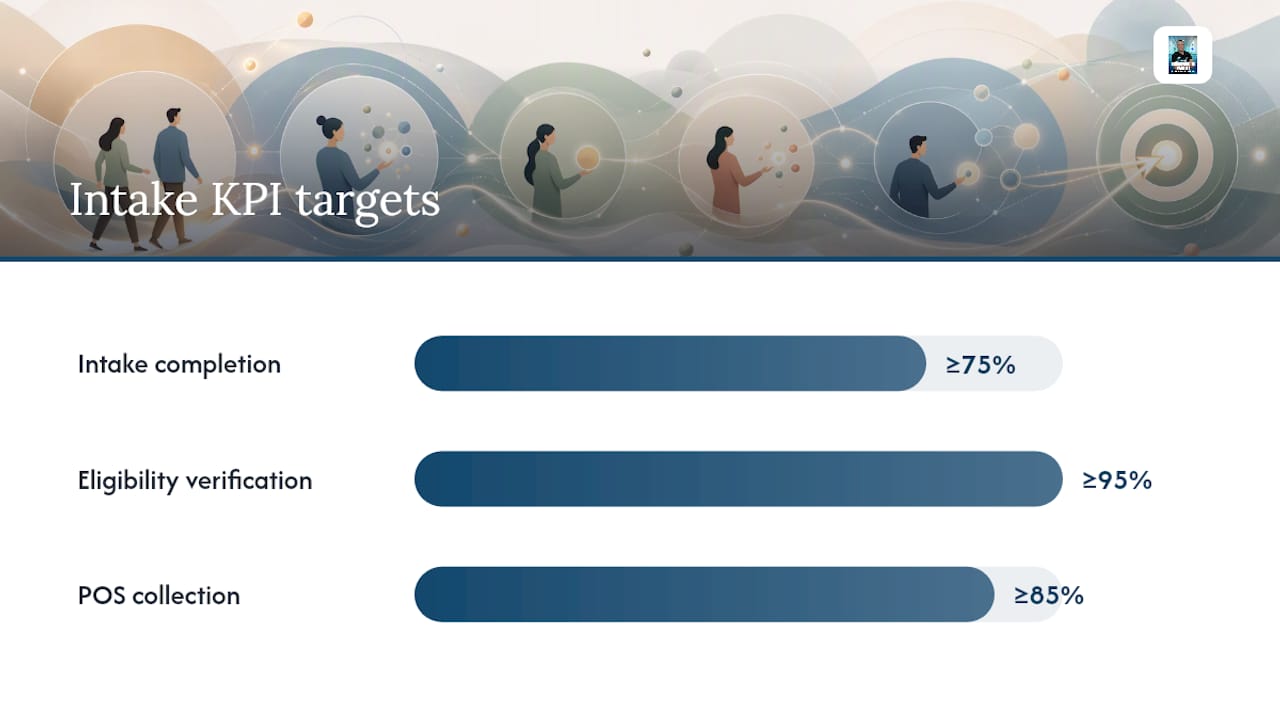
Set these baselines before you change anything. You cannot prove ROI without a before number.
What does the clinical intake sequence actually look like step by step?
This is the sequence front-desk staff and medical assistants follow from the moment a patient is scheduled to the moment the clinician enters the room. The order matters — skipping steps creates rework.
- Pre-visit outreach (24–48 hours before): Send the intake form link via SMS or patient portal. Pre-fill any known fields (name, DOB, last known insurance) to reduce friction.
- Identity and demographics verification (arrival): Confirm legal name and date of birth against the appointment record. These are the two patient identifiers required by most clinical safety standards.
- Insurance eligibility check: Run a real-time eligibility query against the payer. Flag any mismatches before the patient reaches the MA.
- Rooming — MA tasks: The standard clinical intake sequence for medical assistants is: greet the patient, verify two identifiers (name and DOB), reconcile medications and allergies, document the chief complaint, record vitals, and complete final EHR documentation.
- Medication and allergy reconciliation: Compare the patient's reported list against the EHR record. Discrepancies get flagged for the clinician, not silently overwritten.
- Chief complaint capture: Document in the patient's own words. This is distinct from the diagnosis — it's what the patient says is wrong.
- Consent collection: Confirm all required consents are signed and timestamped. E-signatures with audit trails are preferable to paper for both compliance and retrieval speed.
- EHR write-back: All collected data maps into discrete structured fields in the EHR — not as a PDF attachment. This is the step most practices get wrong.
Clinical MA rooming checklist: Verify two identifiers (name + DOB) → record vitals → reconcile medications and allergies → document chief complaint → confirm consents signed → complete EHR documentation.
Pro Tip: Apply field-level validation at steps 1 and 3 — specifically on member ID format, DOB, and phone number. Catching a transposed digit at entry costs seconds; catching it after a claim denial costs days.
Where do intake workflows break down most often?
Every practice has a different failure point, but the same categories show up repeatedly. Knowing which one is costing you the most is the first step toward fixing it.
- Paper re-entry: Staff transcribe handwritten forms into the EHR manually. Every transcription is an opportunity for error, and the errors don't surface until billing.
- Missing insurance or referral information: Patients arrive without their current insurance card or without a required referral. The visit happens anyway, and the claim gets denied later.
- Poor identity matching: Slight name variations (Jr., hyphenated surnames, nicknames) create duplicate records or failed eligibility checks.
- Language barriers: Patients who don't read English well enough to complete forms accurately produce incomplete or incorrect clinical histories. This is a patient safety issue, not just an administrative one.
- Inconsistent consent capture: Some patients sign everything; others sign nothing. Without a systematic check, practices discover missing consents during audits rather than at intake.
- Accessibility gaps: Patients with low digital literacy, visual impairments, or limited smartphone access can't complete digital forms without assistance. A digital-only intake with no fallback excludes a meaningful portion of most patient populations.
The downstream risk of each pain point is different. Missing insurance data leads to claim denials. Poor identity matching creates duplicate records that require manual merging. Language barriers produce inaccurate clinical histories that affect care quality. Inconsistent consents create legal exposure. Accessibility gaps drive patient churn — patients who find intake frustrating often don't come back.
For high-friction patient groups (elderly, language-limited, low-digital-literacy), the practical fallback is a hybrid model: offer digital forms as the default, but keep a staff-assisted paper or tablet option available at the front desk. The goal is completion accuracy, not channel purity.
Traditional vs. digital patient intake: which approach fits your practice?
The honest answer is that most practices need both, at least during a transition period. But the operational case for digital intake is strong once volume crosses a certain threshold.
| Dimension | Traditional (paper/phone) | Digital intake |
|---|---|---|
| Best for | Low-volume, elderly-heavy, or low-tech patient populations | Practices with ≥ 20 appointments/day and smartphone-capable patients |
| Data capture | Handwritten or phone-collected, manually transcribed | Entered directly by patient, validated at entry, written to EHR |
| Throughput impact | Check-in takes 20 minutes per patient | Check-in drops to under 5 minutes when pre-visit form is complete |
| Staff role | Full data entry + verification | Exception handling only (flagged fields) |
| Error rate | Higher — transcription introduces errors | Lower — validation catches format errors at entry |
| Patient UX | Familiar but slow; waiting room friction | Convenient pre-visit; requires smartphone access |
| Compliance | Paper storage, manual audit trail | Encrypted, timestamped, audit-logged when configured correctly |
When to prioritize digital intake:
- Your practice sees 20 or more appointments per day and front-desk staff are consistently behind.
- Your claim denial rate is above 5% and eligibility mismatches are a known cause.
- You're adding providers or locations without adding administrative headcount.
- Patient satisfaction scores flag wait time or paperwork as top complaints.
Hybrid approach: Digital-first with in-office assistance works well for most mixed populations. Send the pre-visit link to everyone. For patients who arrive without completing it, have a front-desk tablet with the same form available. Staff assist only when the patient requests it. This approach captures the throughput benefit for the majority while not abandoning patients who need help.
Static digital forms — where every question appears regardless of relevance — achieve completion rates of 20–35%. Dynamic conditional forms (which show only relevant questions based on prior answers) perform significantly better. Conversational AI intake achieves 55–75% completion rates and captures richer clinical narrative, but requires a PHI-ready vendor with a signed Business Associate Agreement.
How to optimize patient intake: a prioritized operational checklist
Run through this list in order. The items at the top deliver the fastest ROI with the least implementation effort.
- Audit your current forms. List every field. Ask: does a clinician actually use this data? Cut anything that isn't required for billing, clinical care, or compliance. Shorter forms complete at higher rates.
- Enable pre-visit form delivery. Set up SMS or email links sent 24–48 hours before the appointment. This one change shifts the majority of data entry off the front desk.
- Add field-level validation. Require correct format for DOB, phone number, and member ID at the point of entry. Don't let the form submit with a five-digit ZIP code or a nine-digit phone number.
- Automate eligibility verification. Connect your intake tool to a real-time eligibility API. Run checks the day before the appointment, not the morning of.
- Implement e-consent. Replace paper consent forms with timestamped electronic signatures. Store them in the EHR, not in a filing cabinet.
- Require bidirectional EHR write-back. Every field in the intake form should map to a discrete structured field in the EHR. If your vendor offers only a PDF drop, that's a deal-breaker.
- Set up an exception queue. Any field that fails validation or returns an eligibility mismatch routes to a staff queue for resolution before the appointment, not at the front desk during check-in.
Pro Tip: Pre-fill every field you already know — name, DOB, last known insurance, and preferred language. Patients complete shorter forms at higher rates, and pre-filled forms signal that the practice already knows them. Also, design for mobile first: most patients complete intake forms on their phones, so large touch targets and minimal scrolling reduce abandonment significantly.
What should you look for in a patient intake solution?
The market has a range of tools, from standalone digital form builders to fully integrated intake platforms. The difference between them isn't features — it's integration depth.
Feature checklist for any intake solution:
- Mobile-first form design with responsive layout and large touch targets
- Conditional logic (dynamic forms that show only relevant questions)
- E-signature capture with timestamped, immutable audit trail
- Real-time insurance eligibility API connections
- Bidirectional EHR write-back into discrete structured fields (not PDF attachments)
- HIPAA-compliant data handling with signed BAA available
- Role-based access controls and audit logs
- Language support and WCAG 2.1 Level AA accessibility compliance
- Analytics and reporting on completion rates, check-in times, and field-level abandonment
Three platforms worth evaluating:
Phreesia is the most widely deployed enterprise intake platform in the U.S. market. It handles eligibility verification, payment collection, and patient-reported outcomes in a single workflow, with deep EHR integrations across major systems. It's best suited to mid-size and large practices that need a full-featured platform with strong analytics.
Curogram focuses on two-way SMS communication and digital intake forms, making it practical for practices that want to improve pre-visit communication without a full platform overhaul. It integrates with a range of EHR systems and is particularly well-reviewed for ease of staff adoption.
DocResponse combines digital intake with telehealth and appointment management, positioning it for practices that want to consolidate tools. Its intake forms support conditional logic and EHR write-back, and it's designed for smaller to mid-size practices that want a lighter implementation footprint.
Evaluation dimensions:
| Axis | What to ask the vendor |
|---|---|
| EHR integration | "Show me a FHIR R4 payload mapping into discrete fields — not a DocumentReference attachment." |
| Security posture | "Provide your BAA template, SOC 2 report, and evidence of TLS 1.2+ in transit." |
| Patient UX | "What is your average form completion rate across clients? Do you support Spanish and Creole?" |
| Deployment | "Can patients complete forms offline and sync on reconnect?" |
| Pricing | "What's the per-encounter cost at our volume? Are eligibility checks included or billed separately?" |
| Reporting | "Can I see completion rate, average check-in time, and field-level abandonment in a single dashboard?" |
The integration depth question is the one that separates real solutions from expensive form builders. Require vendors to demonstrate FHIR R4 payloads mapping into discrete EHR fields before you commit. A vendor who can't show you that in a demo is telling you something important. For practices exploring platform alternatives, a comparison of JaneApp alternatives covers migration considerations worth reviewing.
How to implement digital intake: pilot, measure, iterate, scale
Don't launch to your full patient panel on day one. Run a 2–4 week pilot with a single provider or one appointment type to surface EHR mapping errors and staff friction before scaling.
Implementation timeline:
- Weeks 1–2 (setup): Configure forms, map fields to EHR, set up eligibility API, train front desk and MAs, define exception queue workflow.
- Weeks 3–6 (pilot): Run with one provider or appointment type. Track three daily metrics: completion rate, average check-in time, and number of fields staff still fix manually.
- Weeks 7–8 (iterate): Fix every mapping error and friction point surfaced during the pilot. Retrain staff on any workflow changes.
- Weeks 9–12 (phased rollout): Expand to additional providers or appointment types one at a time. Don't add a new segment until the previous one is stable.
- Month 4+ (scale and optimize): Full deployment. Shift reporting from daily pilot metrics to weekly operational review and monthly executive summary.
Stakeholder matrix:
| Role | Owns |
|---|---|
| Front desk lead | Form delivery, exception queue management, patient assistance |
| Medical assistant | Rooming sequence, MA-specific field verification, EHR documentation |
| Billing manager | Eligibility verification setup, denial tracking, collections reporting |
| IT / EHR admin | Integration configuration, field mapping, access controls |
| Clinical lead | Form content approval, consent language, clinical field accuracy |
| Vendor PM | Implementation timeline, technical support, training materials |
Pilot metrics table:
| Metric | How to measure | Target threshold |
|---|---|---|
| Pre-visit completion rate | Forms completed before arrival / total sent | — |
| Average check-in time | Clock arrival to roomed | ≤ 10 minutes during pilot |
| Manual field corrections | Fields staff edit after patient submission | Trending down week over week |
| Eligibility match rate | Verified before visit / total appointments | ≥ 90% by end of pilot |
Sit with front-desk staff during real patient flows in the first week. You'll find mapping errors and friction points in 30 minutes of observation that a vendor demo would never surface.
A sample intake workflow for a chiropractic clinic
This example is drawn from the intake model used at Sparkmed, a chiropractic clinic in North Miami serving patients recovering from car accidents, work injuries, and slip-and-fall events. It's designed for a small staff and a high proportion of first-time patients.
Form fields for post-accident chiropractic intake:
- Full legal name, date of birth, preferred language (English, Spanish, Creole)
- Contact information: phone (with format validation), email, emergency contact
- Accident details: date of accident, type (auto, work, slip-and-fall), case/claim number if applicable
- Primary complaint: location, onset, pain scale, aggravating and relieving factors
- Current medications and known allergies (with a free-text field for details)
- Prior treatment for this complaint (yes/no with follow-up if yes)
- Treatment consent and HIPAA notice acknowledgment
- Financial responsibility agreement and payment option selection
Timing estimates:
| Task | Who | Time |
|---|---|---|
| Pre-visit form completion | Patient (at home) | 8–12 minutes |
| Arrival identity confirmation | Front desk | 1–2 minutes |
| Insurance/claim verification | Front desk | 2–3 minutes |
| MA rooming (vitals, meds, chief complaint) | MA | 5–7 minutes |
| Clinician handoff | MA → clinician | 1 minute |
Total time from arrival to clinician entry: under 12 minutes for patients who completed the pre-visit form. For patients who arrive without completing it, the front desk tablet option adds 8–10 minutes.
For first-time patients, Sparkmed's promotional pricing for first visits creates a natural incentive to complete the pre-visit form: the confirmation message includes the form link alongside the appointment details and pricing information. Completion rates for first-time patients are higher when the form is tied to a confirmation they're motivated to read.
For small clinics with two or three staff members, role clarity matters more than headcount. Assign one person to own the exception queue each day. That person handles every flagged field, every missing insurance detail, and every patient who needs form assistance. Everyone else runs the standard flow.
Pro Tip: For accident-recovery patients, include a brief explanation of why you're asking for accident details — "This helps us coordinate with your insurance or attorney if needed." Patients who understand why a field exists complete it more accurately. This connects directly to how intake information supports patient education and recovery outcomes.
For a detailed breakdown of the chiropractic intake workflow after auto accidents, including staff task assignments and timing, see Sparkmed's chiropractic intake workflow guide.
How do you measure whether your intake improvements are working?
Measurement without a cadence is just data collection. Set a reporting routine from day one of your pilot and keep it after you scale.
KPIs with definitions and targets:
- Intake completion rate: Percentage of patients who finish the pre-visit form before arrival. Target: ≥ 75% at steady state.
- Average check-in time: Minutes from patient arrival to being roomed. Target: ≤ 8 minutes.
- Eligibility verification rate: Percentage of appointments where eligibility is confirmed before the visit. Target: ≥ 95%.
- Transcription hours saved: Staff hours per week no longer spent re-entering form data. Track this as a labor cost reduction.
- Point-of-service collection rate: Co-pays and outstanding balances collected at the time of the visit. Target: ≥ 85%.
- Claim denial rate (intake-related): Denials attributable to eligibility mismatches, missing demographics, or authorization gaps. Track separately from clinical denials.
Reporting cadence:
- Daily (during pilot): Completion rate, check-in time, manual field corrections. Reviewed by the front desk lead and MA lead.
- Weekly (ongoing): All six KPIs above, plus denial rate trend. Reviewed by the practice manager and billing manager.
- Monthly (executive summary): KPI trends, collections impact, staff hours saved, denial rate vs. baseline. Reviewed by the clinical lead and administrator.
The financial connection is direct. A 10-percentage-point improvement in eligibility verification rate translates to fewer denied claims per month. Fewer denials mean less time spent on appeals and faster cash flow. Point-of-service collection improvements reduce accounts receivable aging. These numbers belong in the monthly executive summary alongside the operational KPIs — intake is a revenue function, not just an administrative one.
What does HIPAA compliance require for digital intake?
Digital intake handles Protected Health Information from the first field the patient fills in. Compliance isn't a post-launch checklist item — it's a pre-launch requirement.
Compliance checklist before going live:
- Signed Business Associate Agreement (BAA) with every vendor that touches PHI
- Encryption in transit: TLS 1.2 or higher on all data transmission
- Encryption at rest: AES-256 or equivalent for stored PHI
- Tokenized, single-use form links that expire after use (no reusable URLs containing PHI)
- No PHI stored in browser localStorage or client-side caches
- Timestamped, immutable consent storage with audit trail
- Role-based access controls limiting PHI access to staff with a need to know
- Audit logs retained for a minimum of six years per HIPAA requirements
- WCAG 2.1 Level AA accessibility compliance (required for Medicare/Medicaid providers)
What to request from vendors:
| Document | Why you need it |
|---|---|
| BAA template | Required before any PHI is processed in production |
| SOC 2 Type II report | Evidence of operational security controls |
| FHIR R4 compliance documentation | Confirms structured data exchange capability |
| TLS configuration evidence | Confirms encryption in transit meets minimum standard |
| WCAG conformance statement | Confirms accessibility posture for regulatory purposes |
Custom intake portals require tokenized single-use links that expire, TLS 1.2+ in transit, no PHI in browser localStorage, and timestamped immutable consent storage — along with a signed BAA before any production PHI is handled. Ask every vendor for these specifics, not just a general HIPAA compliance claim.
Involve your compliance officer or legal counsel before finalizing vendor contracts. A vendor's self-attestation of HIPAA compliance is not the same as a reviewed BAA and a SOC 2 report.
Who else owns intake beyond the front desk and MA?
Intake is often treated as a front-desk function. It's not. Multiple roles carry accountability for different parts of the process, and gaps in ownership are where errors accumulate.
Billing team: Owns eligibility verification and the exception queue for insurance mismatches. If a patient's coverage can't be confirmed before the visit, billing decides whether to proceed, collect a deposit, or reschedule. They also own the feedback loop: when a claim is denied for an intake-related reason, billing should trace it back to the specific intake step that failed and flag it for process correction.
IT and EHR administrator: Owns the integration layer. Field mapping between the intake form and the EHR is a technical configuration, and it breaks when EHR updates change field structures. IT needs to own a quarterly review of field mapping accuracy, not just a one-time setup.
Clinical lead or medical director: Approves the clinical content of intake forms. The question list, the medication reconciliation protocol, and the chief complaint capture format are clinical decisions, not administrative ones. A clinical lead who reviews intake forms annually catches outdated question sets before they affect care quality.
Compliance officer: Owns the BAA inventory, audit log review schedule, and staff training on PHI handling. Digital intake expands the PHI surface area — more vendors, more transmission points, more access logs to review.
Practice manager: Owns the overall workflow design, the KPI reporting cadence, and the change management process when intake tools or procedures change. This is the role that connects the operational, clinical, and financial threads.
How should you communicate with patients during intake?
The message patients receive alongside their intake form determines whether they complete it. A link with no context gets ignored. A message that explains why the form matters and what to expect gets completed.
What works in pre-visit communication:
- Send via the channel the patient used to book (SMS if they booked by phone, email if they booked online). Don't assume one channel reaches everyone.
- Include the appointment date, time, and provider name in the same message as the form link. Patients who can't remember what the message is about don't click.
- Explain the benefit in one sentence: "Completing this form before your visit means less paperwork when you arrive and a faster check-in."
- Set a completion deadline: "Please complete this by [date] so we can confirm your insurance before your visit."
- For patients with language preferences, send the form in their preferred language. Technology that supports multilingual access directly improves completion rates and reduces the risk of inaccurate clinical histories.
At the front desk: When a patient arrives without completing the pre-visit form, the front desk response matters. Don't make the patient feel penalized. Offer the tablet option, assist if needed, and capture what you can. A partial form with validated key fields is better than a complete paper form that requires full transcription.
During rooming: The MA's communication during the clinical intake sequence affects data quality. Asking "Are you taking any medications?" gets a different answer than "Can you walk me through everything you're currently taking, including vitamins and supplements?" Train MAs on specific question phrasing for medication reconciliation and allergy capture. Accurate allergy documentation is a patient safety issue that starts with how the question is asked.

How do you map and analyze your existing intake workflow?
You can't improve what you haven't drawn. Mapping the current state before changing anything is the step most practices skip, and it's why many "improvements" create new problems while solving old ones.
How to build a current-state map:
Start by following a patient through the entire intake sequence in real time, from the moment they receive the appointment confirmation to the moment the clinician enters the room. Document every step, every handoff, every tool used, and every decision point. Don't rely on what staff say they do — watch what they actually do.
Capture four things for each step: who does it, how long it takes, what tool or form is used, and what happens when something goes wrong. That last column is where the real problems live.
Then look for three patterns: steps that require manual re-entry of data already captured elsewhere; handoffs where information is lost or delayed; and decision points where staff use judgment to fill gaps that should be handled by the system.
Common findings from current-state mapping:
- The same patient identifier is entered three times across three different systems.
- Insurance eligibility is checked the morning of the appointment, not the day before, leaving no time to resolve mismatches.
- Consent forms are signed at the front desk but stored in a paper file that billing never sees.
- The MA asks about medications verbally and documents from memory rather than from a patient-completed form.
Once you have the map, calculate the total time per patient and the error rate at each step. This gives you the baseline against which you'll measure every improvement.
How do you prioritize intake improvements when everything feels urgent?
Not every intake problem costs the same amount. Prioritize by two axes: financial impact and implementation effort.
High impact, low effort (do these first):
- Add field validation to DOB and member ID fields in your existing forms. This takes hours to configure and prevents the most common eligibility mismatches.
- Send pre-visit form links via SMS. If you already have a form, adding a delivery mechanism is a configuration change, not a project.
- Move co-pay collection to pre-visit. If your current system supports it, this is a settings change with immediate collections impact.
High impact, higher effort (plan these next):
- Implement bidirectional EHR write-back. This requires vendor selection or integration work, but it's the change that eliminates transcription entirely.
- Add real-time eligibility verification. Requires an API connection to your payer mix, but reduces denials at the source.
- Build a multilingual form option. Higher effort, but critical for practices serving non-English-speaking populations.
Lower impact (defer or skip):
- Redesigning the waiting room check-in experience before fixing the pre-visit form. If patients are completing forms at home, the waiting room becomes less relevant.
- Adding conversational AI intake before your dynamic form is optimized. Conversational intake is a refinement, not a foundation.
The impact-effort matrix keeps teams from spending six months on a waiting room tablet experience while the real problem — missing insurance data — goes unfixed.
Real-world examples of intake workflow improvements
A multi-provider primary care practice moved from paper clipboards to a digital intake platform with SMS delivery and real-time eligibility verification. Within 90 days of full deployment, front-desk staff reported spending the majority of their check-in time on exception handling rather than data entry. Claim denials attributed to eligibility mismatches dropped measurably in the first billing cycle after launch.
A chiropractic clinic serving accident-recovery patients (similar in profile to Sparkmed's North Miami practice) implemented pre-visit digital forms with accident-specific fields and automated insurance/claim verification. The intake form included a field for the patient's attorney or case manager contact information, which reduced the number of phone calls billing staff made to gather third-party payer details. The accident injury recovery assessment workflow at Sparkmed reflects this kind of structured, role-specific intake design.
A small specialty practice ran a two-week pilot with a single provider before expanding. During the pilot, the team discovered that three form fields were mapping to the wrong EHR fields — a configuration error that would have affected every patient record if they had launched to the full panel. The pilot caught it in week one. They corrected the mapping, retrained the MA on the updated rooming sequence, and expanded to the full practice in week five.
The pattern across all three: the practices that saw the fastest improvement were the ones that mapped their current state first, piloted small, and fixed mapping errors before scaling. The ones that launched to the full panel immediately spent the first three months in remediation.
Key Takeaways
A well-designed patient intake workflow reduces claim denials, cuts check-in time, and shifts front-desk staff from data entry to exception handling — but only when it includes field validation, real-time eligibility, and bidirectional EHR write-back.
| Point | Details |
|---|---|
| Pilot before scaling | Run a 2–4 week pilot with one provider to catch EHR mapping errors before full deployment. |
| Require EHR write-back | Bidirectional FHIR R4 integration is the single biggest predictor of digital intake success. |
| Validate at entry | Field-level validation on DOB, member ID, and phone format prevents the majority of eligibility mismatches. |
| Measure from day one | Track completion rate, check-in time, and manual corrections daily during the pilot to prove ROI. |
| Design for your whole patient population | Multilingual support and WCAG 2.1 Level AA accessibility are required for Medicare/Medicaid providers, not optional. |
The trade-off most practices get wrong
The most common mistake in intake improvement projects isn't choosing the wrong software. It's treating intake as a technology problem when it's actually a workflow design problem with a technology component.
Practices that buy a new intake platform without mapping their current state first end up digitizing a broken process. The forms are prettier, but the same fields are missing, the same eligibility checks are running too late, and the same staff are fixing the same errors — just in a different interface.
The second mistake is launching too big. A full-panel launch on day one means every mapping error, every staff training gap, and every patient communication failure happens at scale. A two-week pilot with one provider surfaces all of those problems with a fraction of the exposure.
The third is underinvesting in staff training. Digital intake shifts the front desk role from data entry to exception management. That's a meaningful change in how staff spend their time and what skills they need. A 30-minute group training session isn't enough. Role-specific training, with simulated patient flows, is what actually changes behavior.
The practices that get intake right share one characteristic: they treat the pilot as a learning exercise, not a proof of concept. They expect to find problems. They sit with staff during real patient flows. They fix what they find before they scale. That mindset, more than any specific tool or platform, is what separates a successful implementation from a six-month remediation project.
Patient-centered intake design matters too. Patients who find the intake process clear, fast, and respectful of their time arrive at the appointment with a better impression of the practice before they've met the clinician. That first impression affects satisfaction scores, return visit rates, and referrals. Intake is the first clinical touchpoint. Treat it that way.
Authoritative sources and further reading
These references are worth bookmarking for deeper technical or regulatory detail as you build or improve your intake process.
- Medical History — StatPearls, NCBI Bookshelf: The clinical foundation for why comprehensive history-taking matters, including the evidence that a thorough history yields an accurate diagnosis in up to 74% of cases.
- Patient intake — MA exam preparation: The standard clinical intake sequence for medical assistants, including the two-identifier verification protocol and rooming task order.